Covsy

For real estate agents

Covenant documents.Client-ready reports.

Turn covenants and HOA documents into a branded report with key restrictions, amendment changes, fees and supporting source pages. Review it, then share it under your name and brokerage.

No credit card required. Scanned PDFs welcome.

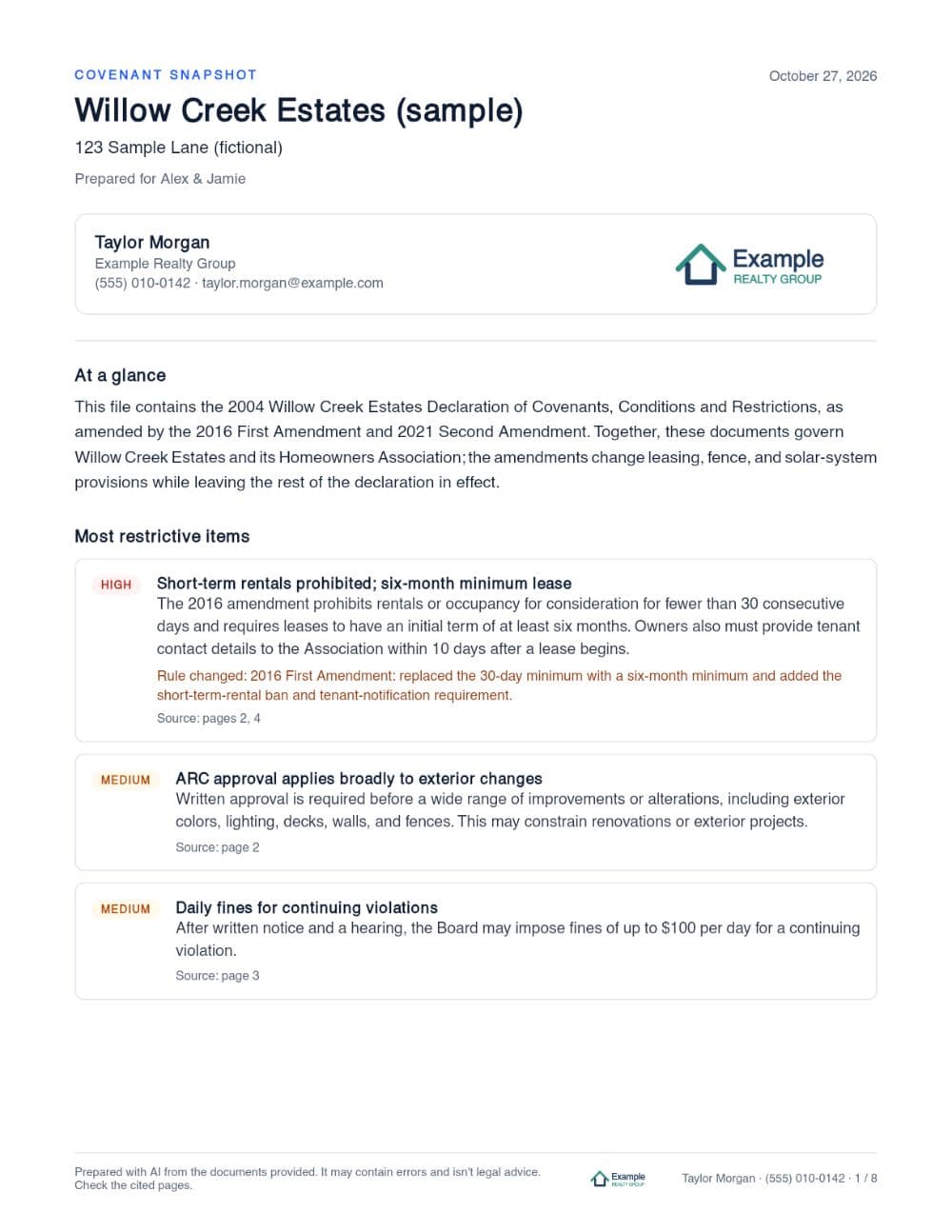
Sample Covenant Snapshot, page 1: Report overview
Open full sample PDF· 8 pages

A sample Covenant Snapshot. The agent, brokerage and community are fictional.

One report. The important findings and the evidence behind them.

  • Important restrictions surfaced first

    Rated by how much they could affect a typical buyer, so the rules that matter lead the report.

  • Amendments considered alongside original provisions

    When a later document changes a rule, the report says so and cites both.

  • Key rules and stated fees summarized

    Pets, rentals, parking, fences, architectural approval, dues and transfer fees in one place.

  • Original source pages attached

    The pages behind each finding come with the report, so your buyer can read the wording.

Every report carries your name, brokerage and contact details. Read the full sample report →

An older rule isn’t always the final word.

Covenant packets often bundle the original restrictions with later amendments. Covsy identifies those documents and explains when later wording changes an answer, citing both.

  1. Original declaration · 2004 · p.2

    “Fences shall not exceed four (4) feet in height, shall be constructed of wood or vinyl…”
  2. Second amendment · 2021 · p.5

    “Fences in rear yards may be up to six (6) feet in height and fences in side yards up to four (4) feet…”
  3. Covsy’s finding

    Six-foot back fenceRestricted

    Allowed in the rear yard with architectural approval.

    Rule changed: the 2021 amendment raised the rear-yard limit from four feet to six.

    Source: p.2 (original), p.5 (2021 amendment)

From the Willow Creek Estates sample packet.

From documents to report in three steps

  1. 1

    Upload your documents

    The PDF from title, the listing agent or county records, including scanned covenant packets.

  2. 2

    Review the findings

    Restrictions, amendments, fees and source references, each linked to the page it came from.

  3. 3

    Download and share

    A report under your name and brokerage, with your logo if you add one.

Go deeper when your buyer has specific questions.

Buyer fit check
Pick what this buyer cares about, like pets, a fence or renting, and see what the documents say about each.
Follow-up questions
Ask anything in plain English and get an answer with the page it came from.
Compare communities
Put two sets of documents side by side when a buyer is deciding between homes.

With Covsy Pro you can also send your client a page with the findings and source pages, where they can ask their own questions.

Try it on the sample packet →

Free account required. No upload needed, and it won’t use your trial allowance.

Sample buyer fit check

Willow Creek Estates

Buyer fit briefingPrepared for Alex & Jamie

  • Two dogsRestricted

    Up to two dogs or cats. Leashed off the lot, and no nuisance barking.

    Source: p.2

  • Renting it on AirbnbProhibited

    Minimum lease term: six months. Short-term stays are prohibited.

    Rule changed: The 2016 amendment replaced the original 30-day minimum and added the short-term rental ban.

    Source: p.2 (original), p.4 (2016 amendment)

Every finding links to its source page in Covsy. A sample from a fictional community.

Simple pricing

Your first 3 properties are free. Upgrade when Covsy becomes part of how you work.

Free trial

$0

No credit card required

  • Your first 3 properties, with everything in Pro
  • A branded report and client PDF for each
  • Client pages, fit checks and comparisons
  • The sample packet, free to explore
Try 3 properties free

Covsy Pro

$19.99

per month, billed monthly

$199

per year, billed annually

Save 17%

  • Up to 40 uploads a month
  • Client reports and fit checks for every buyer
  • Client pages where buyers ask their own questions
  • Compare documents side by side
  • Your name, brokerage and logo on every report
Start free, upgrade any time

Pro includes generous monthly limits (40 reports, 120 fit checks and 600 questions). Cancel any time from Settings; you keep Pro until the end of the period you paid for.

Questions agents ask

Can it read scanned documents?

Yes. Most recorded covenants are photocopies, and Covsy reads them page by page, including old county scans. A long packet is usually ready in about a minute.

What if the packet contains amendments?

Covsy splits the file into the recorded documents inside it and works out which ones appear to be current. When a later document changes a rule, the finding says so and cites both the original wording and the amendment, so you can compare them.

What if the documents don’t answer a question?

Covsy says so plainly (“Not found in these documents”) instead of guessing, and points you to where else a rule might be, such as the plat, city code or the HOA board.

What is included in the free trial?

Your first 3 properties are free, with everything in Pro: the branded report and client PDF, client pages where buyers ask their own questions, fit checks and comparisons. A property counts when you prepare its report, so a bad scan or the wrong file doesn’t use one up, and the sample packet doesn’t count at all. After that, Covsy Pro is $19.99 a month or $199 a year. No credit card needed.

Have a covenant packet for your next showing?

Upload it and have a report ready to review in minutes.

No credit card required.